
How to save an X (Twitter) thread as a PDF
X has no export or print for threads. Bookmarks keep a link that dies with the post, unroll services turn a thread into an article without its look or its replies, and Ctrl+P on x.com comes out mangled. Here is how each option works in 2026, and how to keep a whole thread, images and replies included, as a PDF or one long image.

The short answer
Just the author's text, quickly: paste the link into Thread Reader App and print the result to PDF. The thread as it looks on X, replies and images included: open it signed in, capture it and save the capture as a PDF.
First: you need to be signed in
Since 2023 X shows only part of a conversation to people who are not signed in, and in our test on 2 October 2026 that meant the post plus about four replies, with nothing more on scroll. Any method that works on the x.com page itself needs you signed in to your own account.
Method 1: unroll the thread, then print it
Copy the link of any post in the thread. Share, then Copy link.
Paste it into Thread Reader App. At threadreaderapp.com. You can also reply "@threadreaderapp unroll" under the thread, but that reply is public.
Print the unrolled page to PDF. The thread appears as one article. Press Ctrl+P (Cmd+P) and choose Save as PDF.
Good for reading and quoting: the author's posts become paragraphs of one article. What you lose is everything else: the replies, the look of the posts, quote posts as they appeared, and the counts.
Method 2: bookmark it
The bookmark icon under a post saves it to your private Bookmarks. It costs nothing and keeps nothing: it is a link, and if the post is deleted the bookmark leads nowhere.
Method 3: capture the thread and save it as a PDF
These steps are for FullPage Capture, a free extension to save X threads as PDF, which we make.
Install FullPage Capture. From the Chrome Web Store or Edge Add-ons. Free, no account, no watermark.
Open the thread, signed in. Open the first post. Signed out, X shows only a few replies, so sign in to your own account to see the whole thread and the replies under it.
Click the extension icon. Or press Alt+Shift+K. The page scrolls down the thread, every post and image is captured as it appears, and the sticky header is kept once at the top.
Save as PDF or PNG. Letter or A4 with breaks between lines, one long PDF page, or one tall PNG that you can post or send.
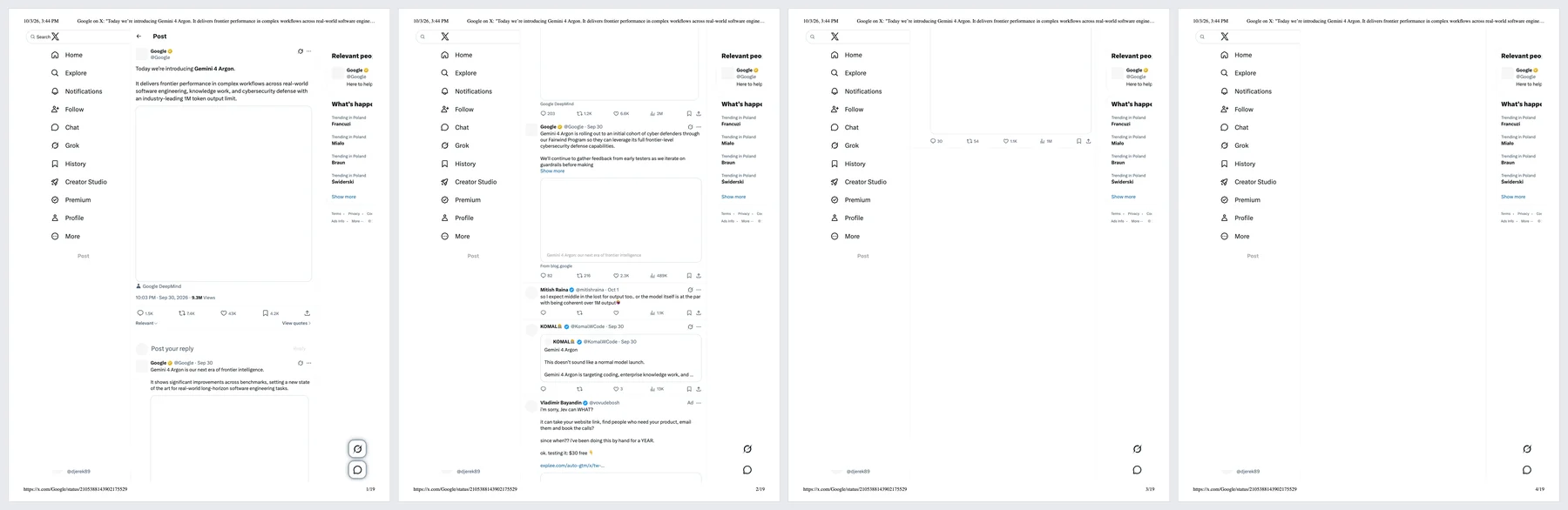
For comparison we printed the same thread with Cmd+P on 3 October 2026. Chrome made 19 Letter pages. The posts end on page 3, every picture is an empty frame, and the side menus are repeated on all 19 pages, 16 of which hold nothing else.
Keep threads before they disappear. Free, no account, nothing is uploaded.
 Add to Chrome
Which method for which job
| Thread Reader App + print | FullPage Capture capture | |
|---|---|---|
| Author's posts | Yes | Yes |
| Replies under the thread | No | Yes |
| Looks like X | No | Yes |
| Images in place | Yes | Yes |
| Without a public reply or account | Paste the URL | NoNeeds your X account |
| Searchable text | Yes | Pro |
Questions
Can I read a whole X thread without an account?
Not any more. Signed out, x.com shows the post you open and a handful of replies, and a profile shows about ten posts; nothing loads as you scroll. Unroll services can still show the author's own thread posts.
Do Bookmarks save the thread?
They save a link, privately. If the author deletes the thread or their account, the bookmark points at nothing. A PDF on your disk does not depend on the author.
Is Thread Reader App free?
Unrolling is free; Premium, for PDF downloads without ads and other extras, costs $3 a month or $30 a year. It is run by independent developers, not by X.
Why does Ctrl+P on x.com come out broken?
X is built as an app, not a document. When we printed a thread, Chrome made 19 pages: the posts ran out on page 3, every picture was an empty frame, and the side menus were repeated on every page. A capture or an unrolled page avoids that.
Can I save the replies too, not just the author's posts?
Unroll services keep only the author's chain. A capture of the thread page, signed in, keeps the replies that X shows under it, as far as you scroll.
Try it on the page you are reading. Free, no account, no watermark. Nothing is uploaded.
Add to Chrome