
How to save a Gmail email as a PDF
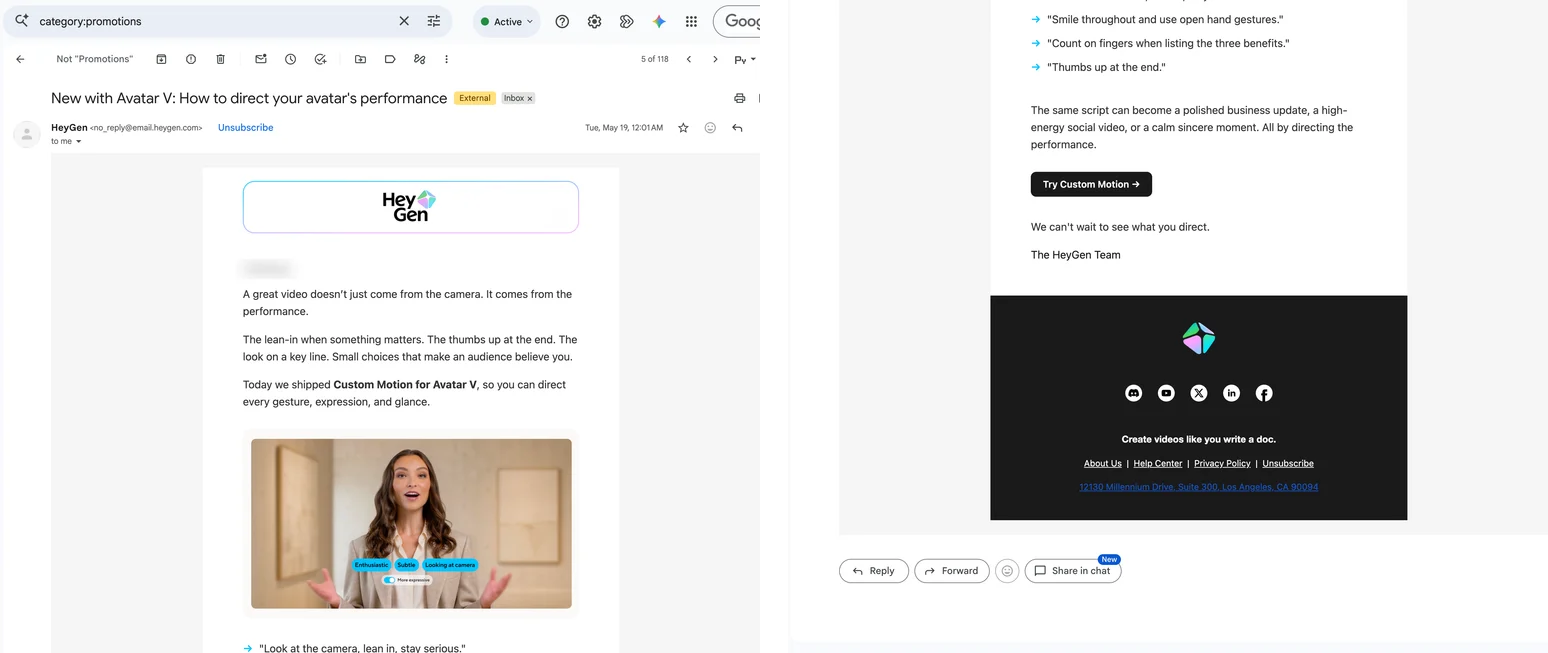
Gmail can save an email as a PDF through Print: fine for a plain message, rough on newsletters, receipts and anything wider than the paper, which can lose images, colours and the right-hand side. Here is how to print one email or a whole thread to PDF, what Download message gives you instead, and how to keep an email exactly as it looks.
The short answer
For a plain email: More → Print, then Save as PDF in the print dialog; Print all for the whole thread. For a newsletter, a receipt, or anything that must look the way it looked: capture the email and save the capture as a PDF.
Method 1: Gmail's Print, then Save as PDF
Open the email. In Gmail on a computer.
Print one message or the thread. For one message, click More (three dots) at the top right of that message, then Print. For the whole conversation, click the Print all icon at the top right of the thread.
Save as PDF. Gmail opens a print view and the browser dialog. Set Destination to Save as PDF. Under More settings, turn on Background graphics and try Margins: Minimum if the email is wide.
The print view drops Gmail's interface and lays the message out for paper. For text emails that is exactly what you want: selectable text, clickable links, a header with the sender and date. For designed emails it is a gamble. Wide layouts are clipped at the right edge, background colours and some images go missing unless Background graphics is on, and long quoted replies can leave blank pages. In Firefox, a long-standing bug cuts Gmail emails short in the print preview.
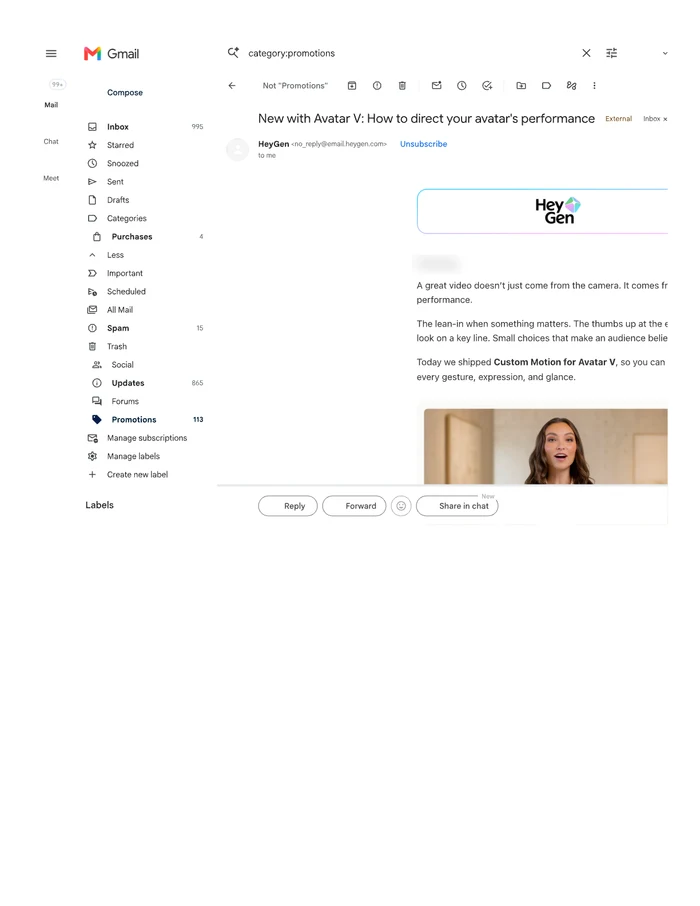
Use Gmail's own Print, not Ctrl+P. Pressing Cmd+P on the same newsletter in Gmail gave us one page: Gmail's sidebar, the first screen of the email cut off at the right edge, and nothing after the product picture, because the message scrolls inside a panel the browser does not unroll.
Method 2: Download message (.eml)
Open the email, click More → Download message. You get the original email as an .eml file, with all headers and attachments, that Outlook, Apple Mail or Thunderbird can open. It is the most complete copy there is and the right thing to forward to IT or a lawyer, but it is not a document that anyone can open and read.
Method 3: capture the email and save it as a PDF
A capture keeps the email exactly as Gmail shows it: the newsletter's layout, its colours and images, the full width, and every message of a thread you expanded. These steps are for FullPage Capture, a free extension to save Gmail emails as PDF, which we make.
Install FullPage Capture. From the Chrome Web Store or Edge Add-ons. Free, no account, no watermark.
Open the email or thread. Expand the messages you want: Gmail folds older ones in a long thread and hides quoted text behind three dots.
Click the extension icon. Or press Alt+Shift+K. Gmail scrolls the message inside its own panel, and the extension unrolls that panel to the end and stitches it into one picture.
Save as PDF. Letter or A4 with breaks between lines, or one long page. Turn on the address and date stamp if the email is evidence.
Save emails that look like the screen. Free, no account, nothing is uploaded.
 Add to Chrome
Which method for which job
| Gmail Print to PDF | FullPage Capture capture | |
|---|---|---|
| Plain text email | Yes | Yes |
| Newsletters and receipts as designed | No | Yes |
| Full width, nothing clipped | Sometimes, with margins | Yes |
| Backgrounds and images | With Background graphics | Yes |
| Whole thread | Print all | Expand, then capture |
| Selectable text | Yes | Pro |
| Address and time stamped | Date in the header | Yes |
| On a phone | Yes | No |
Questions
Does Gmail have a Save as PDF button?
No. Gmail's Print opens a print view, and Save as PDF is a destination in your browser's print dialog. There is no native save to PDF or to Drive.
Why is my email cut off on the right in the PDF?
Many newsletters and receipts are built at a fixed width wider than the paper. Try Margins: Minimum, landscape, or Scale. If it is still cut, capture the email: a capture keeps the full width and scales the page to it.
Why are images or colours missing?
Chrome leaves out backgrounds when printing unless Background graphics is on, and some images load only when you scroll to them. A capture records what is on screen, so both are kept.
Are attachments included?
No, neither in Gmail's print nor in a capture. Download the attachments separately, or open each one and save it.
What is Download message?
More, Download message saves the original email as an .eml file, headers and attachments included, which a desktop mail client can open. It is the most complete copy, but not a document you can send to someone who does not use a mail app.
Can I save a Gmail email as a PDF on my phone?
Yes: in the Gmail app, More, Print (or Print all), then save as PDF in the system print sheet. Extensions do not run on phones.
Can a captured email be used as evidence?
A screenshot with the address and the exact time on it is a good record. FullPage Capture Pro adds Evidence mode: a SHA-256 checksum of the file and a way for anyone to verify it later. Evidence mode
Try it on the page you are reading. Free, no account, no watermark. Nothing is uploaded.
Add to Chrome